
Welcome to Central Dispatch.
A new and improved private marketplace
Finding loads and executing moves is easier on Central Dispatch. You get a modern mobile app, advanced search capabilities, an easy-to-use interface, and so much more. Experience unmatched speed and control in your day-to-day transportation operation.

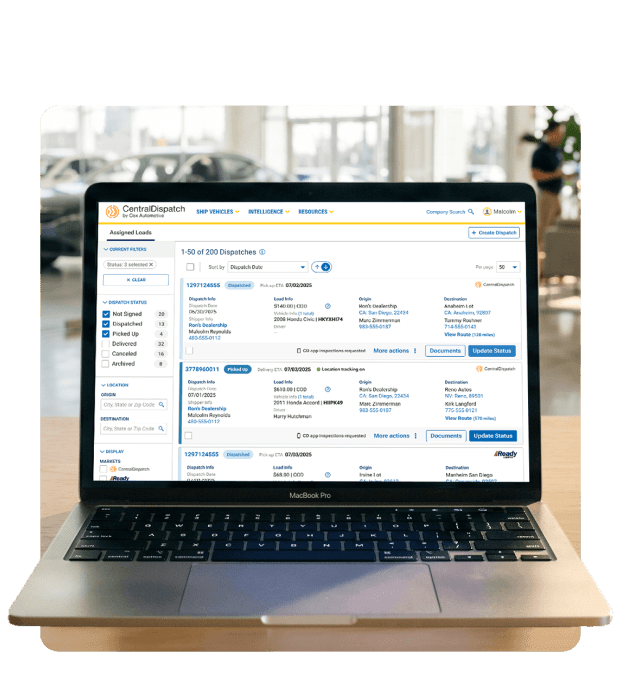

Take control of your vehicle transportation
Find The Right Loads
Improved search filters let you sort by trailer type, vehicle type, pickup location, price per mile, and more.

Drive More Efficiency
Track and manage all your current shipments in one easy-to-use dashboard, and enjoy a more efficient workflow with a fully-modern and streamlined user interface.

Manage Your Entire Team
Create individual accounts for each employee or contractor. Set your own guardrails on what marketplace features they can use, and what sensitive business information they can see.
Getting Started

Logging In
Click “Get Started” to begin setting up your account. Behind the scenes technology will check the Central Dispatch platform to determine if there is an existing account with a matching MC Authority number.
Note: Link expires in 90 days. If expired, contact your broker.
If an existing account is found with matching details, simply log in using your Central Dispatch credentials to link your accounts.
Ensure your credentials are valid and active on Central Dispatch.
If you do not have an existing account, fill out the registration form to create a new carrier profile.

Using the Platform
Access your centralized carrier dashboard to monitor active shipments, search for new loads, and track driver assignments in real time.
Add dispatchers, drivers, and team members to your organization with role-based permissions and secure access control.
Easily toggle between multiple carrier accounts or broker connections from a single unified login.

The Inspection App
Download the app
The new mobile app is required for vehicle inspections on all loads. Download and start using the app today to avoid account restrictions and inactivity.



The Welcome Kit
Get your welcome kit
Now that you’re all set up, download your Central Dispatch welcome kit. It contains quick reference guides that show how to utilize the new dashboard, use advanced search, make an offer, and more.
FAQ’s
We are migrating to the new Central Dispatch platform to centralize your daily transportation operations. Central Dispatch will provide one platform, one app, and one set of tools to fill your trucks and deliver vehicles, and an easy and streamlined way for them to interact with your auto transport broker.
Eligible accounts can enable self-audits right from their account portal! Follow the instructions here to enable self-audits. Contact Customer Service if you have difficulty enabling self-audits in your account portal.
Self-audits are to be completed within 48 hours of notice issued by NextGear Capital. On-site audits are to be completed during the auditor’s visit.
Our verification process lets you easily verify any units that were not present during an audit or not completed successfully. Sign in to the NextGear Capital mobile app, navigate to the Audits tile and select Unverified Vehicle to initiate the verification process. Select an unverified vehicle listed, and follow the prompts to verify with photos of the vehicle. Repeat for each unverified vehicle listed. Audits need to be verified promptly to avoid additional fees.
Any vehicles that remain unverified following the audit must be verified promptly. Additional fees may accrue if unverified vehicles are not verified by day 7.2 A maturity event will be declared on that unit if the audit is not verified before day 15.
Any vehicles that remain unverified following the audit must be verified promptly. Additional fees may accrue if unverified vehicles are not verified by day 7.2 A maturity event will be declared on that unit if the audit is not verified before day 15.