

We’ve recently received questions from customers about Price Check and Price Check Plus. We want to take this opportunity to clarify the difference between each, and reiterate that the free Price Check tool has NOT been replaced by the paid version, Price Check Plus!
The free Price Check tool is always available and easily accessible for any customer with our Core plan, just hit the “Price Check” button as you’re entering your load information. You can also access it through the Intelligence tab, making it even easier to find and use. The additional capabilities of Price Check Plus are only available to Premium customers, or carriers who’ve paid for the tool as an add-on.
Take a look at the benefits and differences of each version of the Price Check tool to see which one can help your business ship more efficiently and profitably!
| Price Check | Price Check Plus | |
| Price comparison to recent loads similar to yours | ✓ | ✓ |
| View each load’s route, distance, list date, and dispatch status | ✓ | ✓ |
| View each load’s final dispatch price and dispatch date | ✓ | |
| AI-powered pricing recommendations that instantly show the optimum rate | ✓ | |
| Cost | Free | See our plans page for pricing details. |
Both versions of the tool are a great way to speed up your shipping process, and list vehicles with more confidence. So be sure to always use the free Price Check tool anytime you post a load.
Dive into more of the great features and capabilities of Price Check and Price Check Plus!
Selecting the right transportation partner is one of the most important decisions for dealers, fleets, and shippers. In this episode of the Auto Remarketing Podcast, Central Dispatch leaders Shanna Wise and Blake Bentley share expert guidance on what to consider before making that choice. They outline five key questions that can help businesses protect their vehicles, reduce risk, and ensure a smooth shipping experience.
The discussion goes beyond the basics, addressing common challenges in automotive logistics and how technology like electronic bills of lading (eBOLs) can improve transparency and accountability. Shanna and Blake also highlight why clear communication and verified credentials matter when building trust with carriers. If you’re looking for practical steps to strengthen your transportation strategy, this episode is packed with insights you won’t want to miss.
The Central Dispatch Marketplace Integrity Team was created to support our clients and help keep them safe on our platform. Hear directly from Katie Louk, Director of Operations, and Caleb Oakley, Sr. Manager, Marketplace Integrity to learn about their roles and how this team helps Central Dispatch clients every day!
Share a bit about your role at Central Dispatch.
Katie: As Director of Operations at Central Dispatch, I lead strategic initiatives to ensure a safe, secure, and seamless platform experience for all users. My focus is on delivering exceptional client service at every touchpoint, from onboarding to ongoing support. I oversee the efficient and timely vetting of all incoming users, ensuring only properly licensed and insured professionals gain access to our network.
Caleb: I lead Marketplace Integrity efforts for Central Dispatch. Lately my role has been focused on addressing fraud in the industry and working with key stakeholders to help secure the marketplace, but I am also engaged in other non-fraud related work that will positively impact Central Dispatch and the industry in general.
What does a typical day look like? What kinds of things are you monitoring or responding to?
Caleb: A typical day for me often involves extensive research and discussion around fraud trends in both the industry and the impact it has on Central Dispatch. I am often engaged in identifying root causes of automotive shipping fraud and place special emphasis on stolen vehicles. While reacting to active incidents is critical, I spend many hours a week engaged in efforts to proactively identify suspicious activity with the goal of preventing fraud and theft from occurring on the platform. Using data analytics and advanced reporting, I am dedicated to staying ahead of bad actors.
What are some of the most common threats or issues you’re on the lookout for?
Caleb: A bad actor’s ultimate goal is to steal high-value/luxury vehicles, and they accomplish this through numerous different schemes, but they all tend to show some similarities. For example, bad actors will often engage in identity theft and pose as legitimate carrier companies to conduct fraudulent activity and so we are often focused on ways to more thoroughly inspect prospective Central Dispatch accounts prior to their activation.
What are the top three priorities the team is currently focused on, and how do these priorities impact the safety and experience of users on Central Dispatch?
Katie: Our top priorities are centered around strengthening the foundation and future of the platform. First, we’re focused on enhancing Marketplace Integrity by allowing only qualified, trustworthy users are active on the platform. Second, we’re committed to delivering an exceptional client experience at every touchpoint, from onboarding to ongoing support.
These priorities play a vital role in ensuring both the safety and overall experience of users on Central Dispatch. By enhancing marketplace integrity, we help prevent fraudulent or unqualified users from entering the platform, creating a more secure environment. Delivering an exceptional client experience ensures users feel supported and confident throughout their journey. Encouraging subscriber longevity fosters a stable, engaged community, which contributes to a more reliable and trustworthy marketplace for everyone.
Caleb: Our top three priorities right now all involve efforts to help protect our customers:
- Making sure we know exactly who is on our platform
- Providing the marketplace with solutions to help track the chain of custody of their vehicle
- Creating barriers for bad actors to mitigate fraudulent activity
Each of our priorities are specifically targeted at addressing the most pressing issues our marketplace and industry are experiencing. Our users want to have an increased level of confidence that everyone on the platform is exactly who they say they are, that their vehicles will make it safely to their intended destination, and that they will not encounter bad actors.
Share an example of how your work has directly improved a user’s experience.
Katie: One clear example of how our work has directly improved a user’s experience involves a broker who was previously one of the most vocal critics of the platform, particularly around issues of fraud. After implementing stronger marketplace integrity measures and increasing transparency around our efforts, he began to recognize and appreciate the work Central Dispatch is doing to combat scammers and protect users. Not only did his sentiment shift, but he also became an advocate, sharing best practices aligned with our standards to his peers, ultimately helping to elevate safety and awareness across the broader user community.
What’s a recent “win” or success story that the team is especially proud of?
Caleb: We are especially proud of the efforts made to move to phone as the only method for multi-factor authentication. We understand that bad actors will often target email accounts, and we are highly confident that moving to phone-only MFA will be a positive step forward in protecting the marketplace and preventing vehicle theft.
What trends are you seeing in the space that could impact how Central Dispatch operates?
Caleb: Central Dispatch is in close communication with the Federal Motor Carrier Safety Administration (FMSCA) and understands that there will be many positive enhancements made to the way the FMCSA from registration processes to their online portal. Central Dispatch is preparing for these changes so that we can continue supporting our customers.
How is the team preparing for these trends or shifts in the industry?
Katie: Our team is taking a proactive, multi-layered approach. We’re building strong partnerships with cybersecurity experts, product and technology teams, and legal and marketing departments to ensure our defenses are both technically sound and strategically aligned. We’re also partnering with our internal physical security teams to help secure assets and leverage their established relationships with law enforcement to support investigations and enforcement efforts.
In addition, we’re collaborating with industry peers, leveraging social media listening to detect early warning signs, and attending industry conferences— not only to stay informed on best practices and innovations, but also to share our viewpoints and contribute as an industry leader.
What do you find most rewarding about working on this team?
Katie: What I find most rewarding about working on this team is the all-in attitude that exists at every level of the organization. Everyone is incredibly resilient, dedicated, and agile, always ready to adapt and support one another. It’s inspiring to be part of a group that consistently shows up with purpose and passion. Above all, it’s the amazing culture we’ve built—one rooted in collaboration, trust, and shared commitment—that makes this work truly fulfilling.
What’s the most surprising thing you’ve learned since joining the team?
Katie: The most surprising thing I’ve learned is just how complex it is to develop new tools while maintaining platform integrity. Balancing innovation with security, compliance, and user trust requires deep cross-functional collaboration, careful planning, and constant vigilance. It’s given me a new level of appreciation for the behind-the-scenes work that keeps the platform both evolving and stable.
What’s one thing you wish more people knew about the work your team does?
Katie: I wish more people knew about the incredible level of care and commitment our team puts into exceeding client expectations. Every decision, every process, and every improvement are made with the client experience in front of mind. It’s not just about meeting standards, it’s about going above and beyond to ensure users feel supported, valued, and confident in the platform.
Caleb: That not only do we hear all the chatter around Central Dispatch and the logistics industry but that we appreciate every bit of it, both positive and negative. Everything we do is done with an eye on the customer’s experience and safety in mind and that there is a team of passionate humans working hard to make a positive difference for everyone.
This edition of Central Dispatch Highlights focuses on both new and existing features to help shippers transport with more control and confidence. Read more below.
Learn more about our new Create Load experience
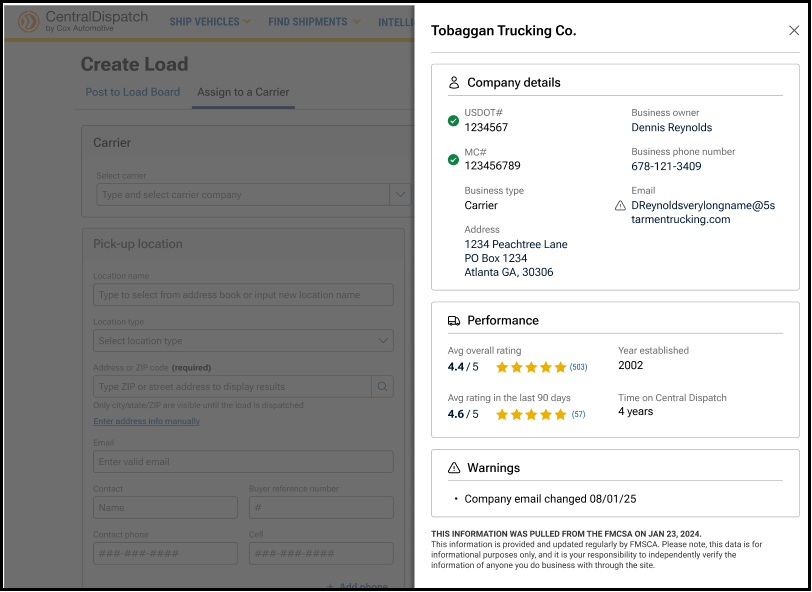
Our new Create Load page allows shippers to post to the load board or assign directly to a carrier from one central location. We’re also introducing a carrier scorecard to this experience to give shippers a view into a carrier’s company details, Transactional Ratings, and flags for any missing or expired FMCSA details, all without leaving this screen.
Take advantage of preferred and blocked functionality
The preferred and blocked functionality helps all Central Dispatch users control who they partner with. Preferred partners will be shown first in search results, while blocked partners will be filtered out.
Manage your Preferred and Blocked companies to shape who you see—and who sees you—on Central Dispatch.
In the fast-moving world of automotive logistics, trust and efficiency are critical. Whether you’re managing a high volume of dispatches or building long-term relationships with reliable partners, having control over your network helps you reduce risk, save time, and operate with confidence.
Central Dispatch’s Preferred and Blocked functionality allows you to manage your professional relationships directly in-platform—promoting visibility for trusted partners and avoiding those you no longer wish to work with.
Preferred Carriers: Streamline Your Workflow
Adding companies to your Preferred network makes it easier to work with trusted partners. Preferred status improves visibility and simplifies selection across key workflows:
- Carriers can filter listings to show only Preferred shippers when searching for vehicles.
- Shippers will see Preferred carriers at the top of the list when creating a dispatch or assigning a load.
- Both can view and manage Preferred status directly from the Network tab of the Company Profile page.
Blocked Partners: Visibility Matters
Blocking a company removes visibility across key workflows—for both sides. Whether you’re a shipper or a carrier, this feature helps you maintain control and protect your business from unwanted interactions.
- Carriers will not see listings from shippers they have blocked or shippers who have blocked them.
- Shippers will not see carriers they have blocked or carriers who have blocked them.
- Both can view and manage Blocked status directly from the Network tab of the Company Profile page.
This mutual visibility removal ensures your network stays focused on trusted relationships—helping you avoid surprises and operate with confidence.
Tips to Get the Most Out of Your Network
- Actively manage your network: Regularly review and update your Preferred and Blocked companies based on recent experiences.
- Use filters wisely: When searching for loads use the ‘Shippers Preferences’ filter to streamline your workflow.
- Ensure proper access: Only users with Owner or Admin roles can manage these lists—make sure the right team members are set up to make updates.
Ready to take action?
Read the step-by-step guide to manage your network with confidence.
Shippers can Create Load and then choose to assign directly to a carrier or post the load to the board.
Overview of Create Load
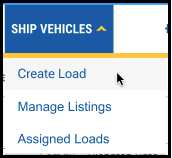
1. Under the Ship Vehicles tab, click Create Load
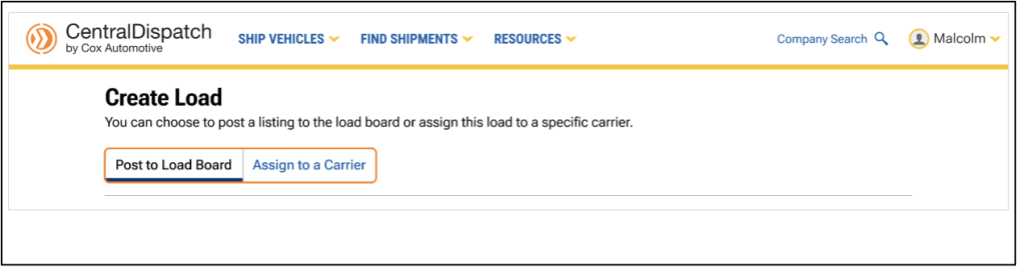
2. From the Create Load page, choose to post the listing to the load board or assign the load to a specific carrier
- The page defaults to Post to Load Board, or click on Assign to a Carrier
- Users can toggle between the Post to Load Board and Assign to a Carrier tabs without losing any load information that was entered
Post to Load Board Tab
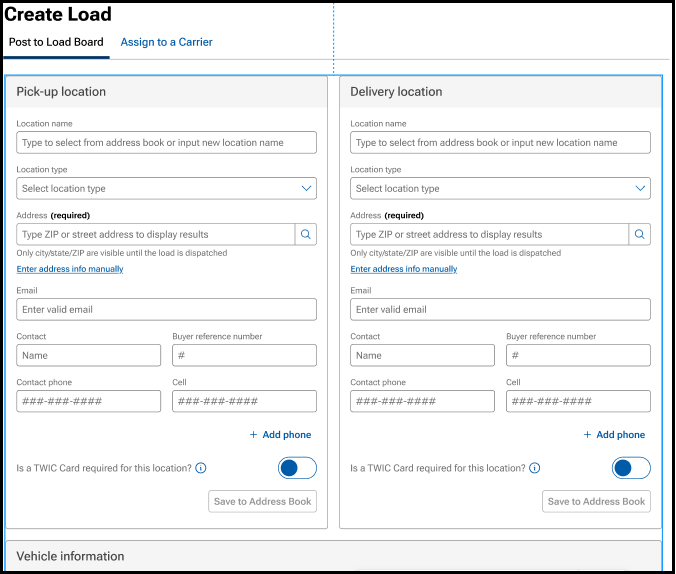
1. Enter load information:
- Type-ahead functionality for address fields speed up data entry and encourages accurate address entry
2. After the load is posted to the board, open Manage Listings to assign to a carrier, modify, archive, or delete a listing
- Manage Listing page contains links to easily toggle between pages

3. Click on the Assigned Loads tab to:
- Edit the dispatch information
- Cancel the dispatch, including the ability to re-list or assign to a new carrier

Assign to a Carrier Tab
1. Select Carrier field is added to the top of the page
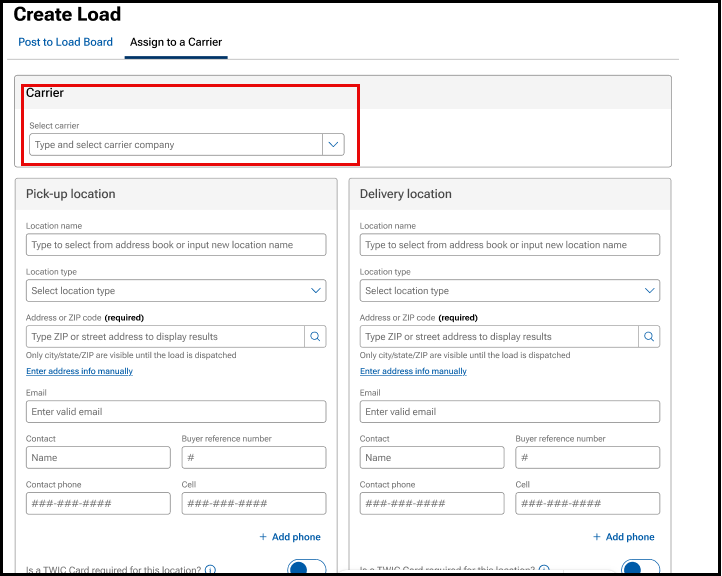
- Slide bar will appear with a carrier scorecard, including performance data, FMCSA data, and a summary of any warnings associated with the carrier to allow for additional investigation. A warning could indicate a recent change in phone number or email address, and are indicated with the triangle icon
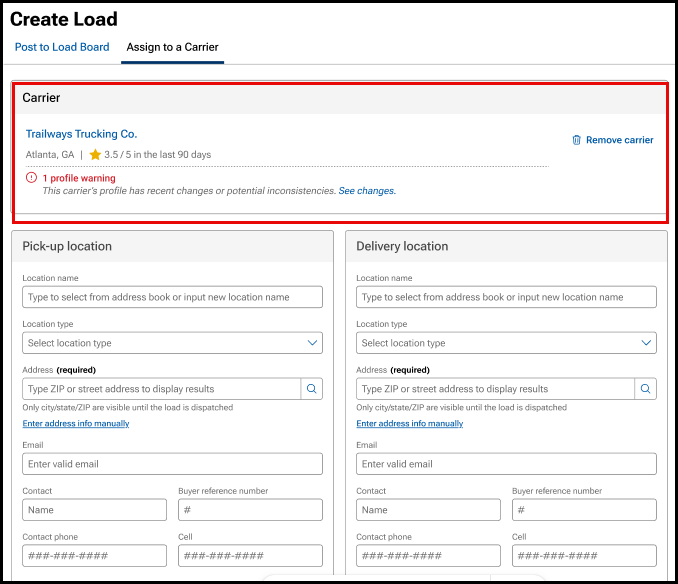
- Carrier name, scorecard, and any carrier warnings display below the carrier selection, making them easier to review
- Click on the trash can icon to remove carrier
2. Enter load information
3. After the load is assigned to a carrier, click on the Assigned Loads tab to:
- Edit the dispatch information
- Cancel the dispatch, including the ability to re-list or assign to a new carrier

Entering Load Information
Step 1: Add Pick Up and Delivery Location Information
- NOTE: Only the city, state, and zip code of locations are visible to the carrier prior to accepting a dispatch. All other information is hidden
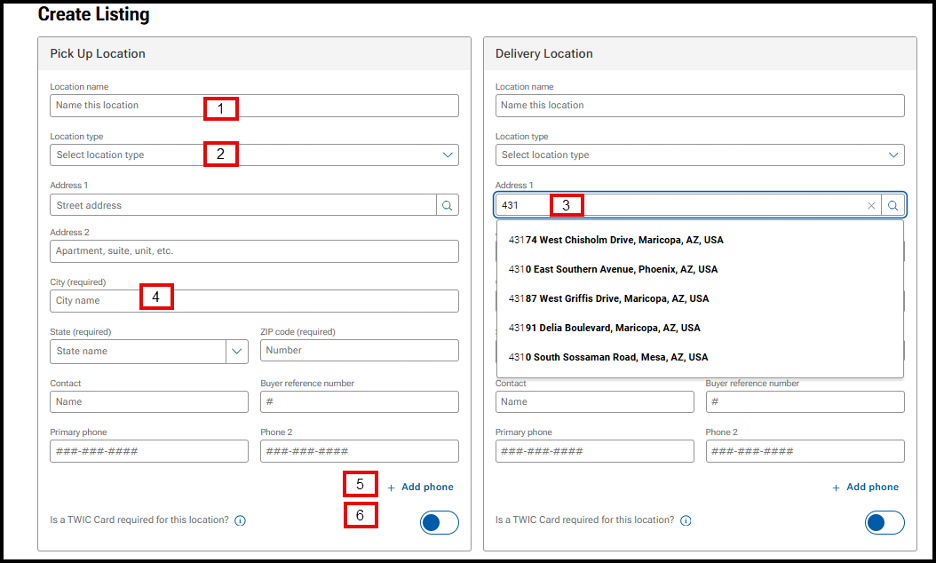
- Location name: Integrates with the address book to populate address and contact information
- Location type: Use the drop-down to choose the location type
- Address: Integrates with Google address lookup to predict and populate address information
- Note: If the address seems to be disappearing after entering, use the Enter key instead of the Tab key
- City/State/Zip code: All fields are required
- Note: Entering the Zip Code will auto-populate City and State
- Phone: Add up to 4 phone numbers for listing by clicking Add Phone
- TWIC Card toggle: Indicates if a TWIC Card is required for location access
- Tooltip text reads: A TWIC (Transportation Worker Identification Credential) is a credential required by the Maritime Transportation Security Act for carriers to access some locations. If you are not sure if a TWIC is needed, please contact the location.
Step 2: Add Vehicle Information
- Note: VIN is hidden from carrier view until the dispatch has been accepted
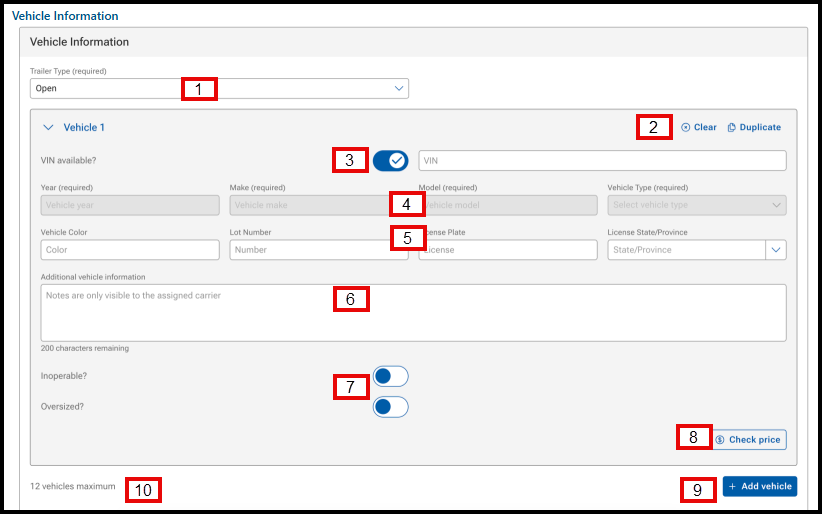
- Trailer Type: Required field. Use the drop-down menu to select the trailer type
- Clear and Duplicate buttons: Clears vehicle information and allows user to duplicate a vehicle (replaces the quantity), respectively
- VIN available? and VIN: VIN available? toggle is defaulted to on, allowing the user to enter the VIN. When the VIN is entered, the Year, Make, and Model (YMM) fields will populate by VIN decoding
- Year/Make/Model/Vehicle Type: Required field. If you enter the VIN, it will be populated by the VIN decoder
- NOTE: If the year of the vehicle is older than 1981 or a specialty vehicle:
- Uncheck the toggle for VIN available?
- Under the Vehicle Type field, use the drop-down to select Other
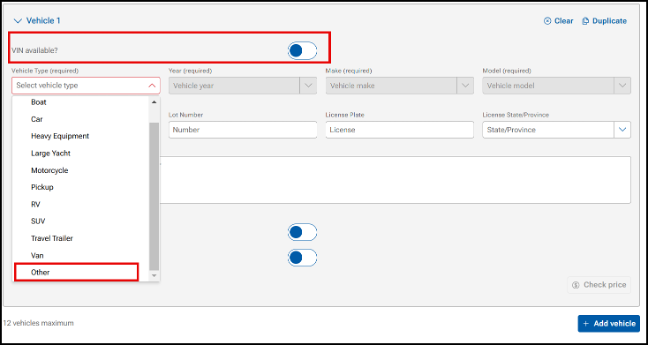
- NOTE: If the year of the vehicle is older than 1981 or a specialty vehicle:
- Vehicle Color/Lot Number/License Plate/License Plate State: Not required fields, but may be helpful for a carrier to locate a vehicle on a lot
- Inoperable/Oversized: Toggles available to indicate operability of vehicle and if oversized
- If Inoperable: Use the drop-down menu to indicate why the unit is inoperable. This information is available to the carrier
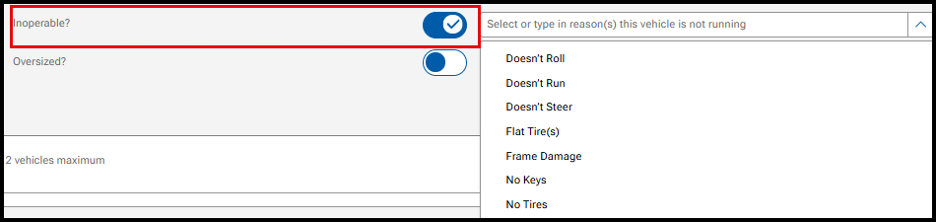
- Check Price: Opens the Price Check tool to view prices on comparable loads
- +Add vehicle: Add additional vehicles to the listing
- Note: User can add up to 12 vehicles to a listing, dictated by the maximum carrier trailer capacity
Step 3: Add Dates
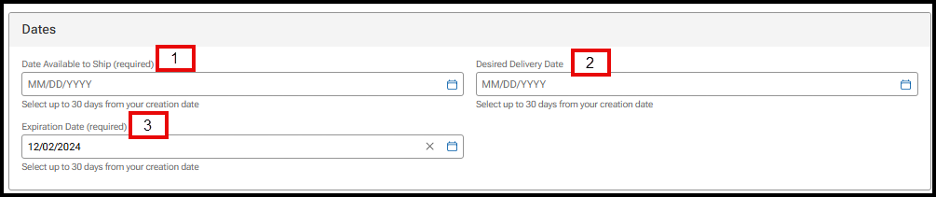
- Date Available to Ship: Required field. Use the calendar icon to select the date the vehicle will be available. Users can select up to 30 days from the listing date
- Desired Delivery Date: Not required. Use the calendar icon to select the desired date for the delivery of the vehicle. Users can select up to 30 days from the listing date
- Expiration Date: Required field. Defaulted to 14 days, but you can use the calendar icon to extend up to 30 days from posting
- Listings that are 30 days from the posting date will be auto-archived and visible under the ARCHIVED tab in Manage Listings
- Listings over 365 days will be removed from Listings
Step 4: Pricing and Payment
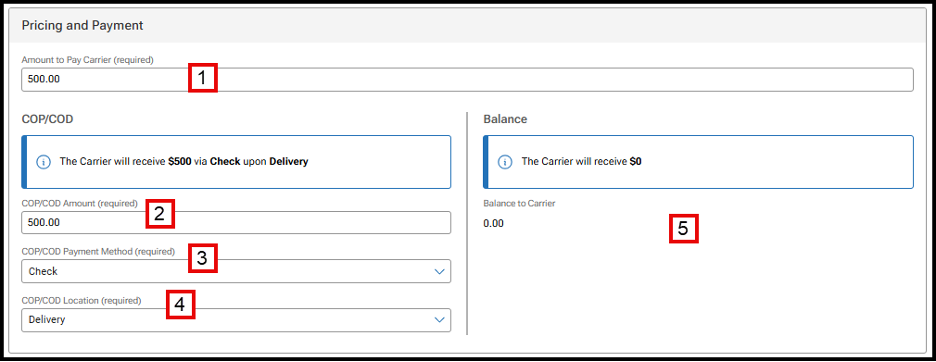
- Amount to Pay Carrier: Required field
- COP/COD Amount: Required field. Users can select the amount to pay a carrier at pick-up or delivery. This allows the ability to pay carriers partial at pick-up and the remainder at delivery
- COP/COD Payment Method: Required field. Use the drop-down menu to select if payment will be made by check or cash
- COP/COD Location: Required field. Use the drop-down menu to select if payment will be made at pick-up or delivery
Balance fields: If the total amount owed to the carrier is split between pick-up and delivery, the Balance fields will be populated and required
Step 5: Additional Information
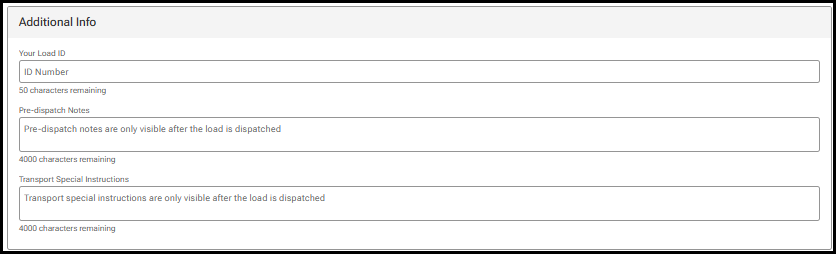
- Load ID allows shippers to enter information to identify a dispatch load. It can be up to 50 characters and anything a shipper chooses. If the Load ID is not populated, one will be generated by Central Dispatch
- Pre-dispatch Notes and Transport Special Instructions are only visible after the load is accepted
STEP 6: Add Your Contract Information
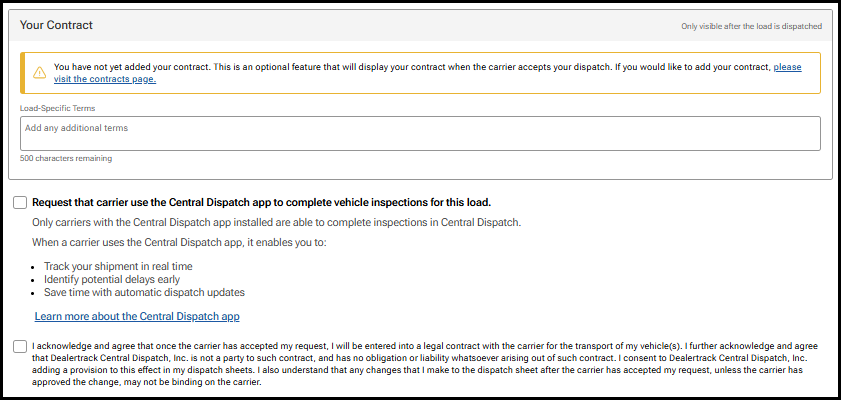
- Add Load-Specific Notes that will be visible prior to a carrier accepting the load
- Click the request carrier to use Central Dispatch mobile app if desired
- Click the acknowledge box:
- If posting to the load board, click the Acknowledge box, and click Post Load
- If posting to the load board, click the Acknowledge box, and click Assign Load
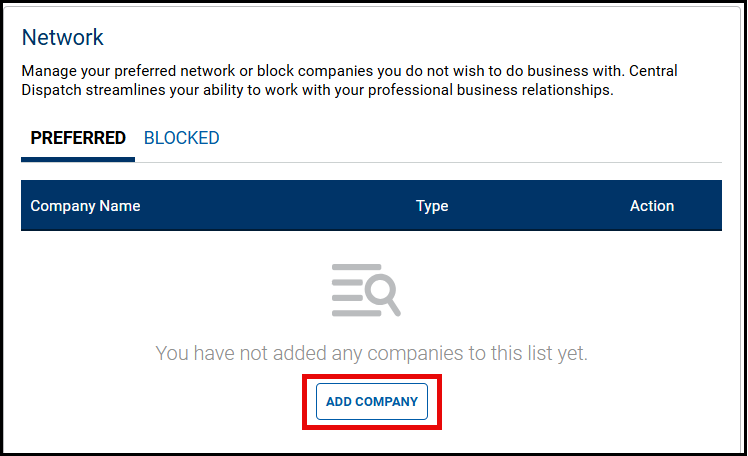
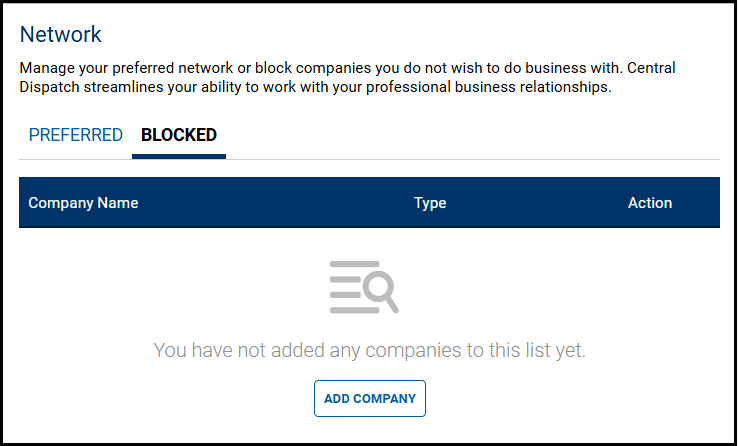
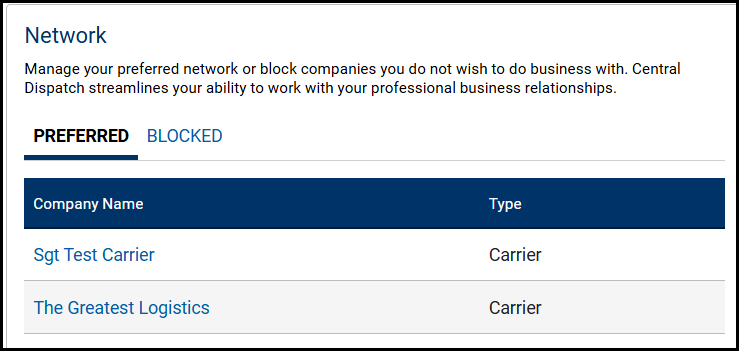
The Network page allows you to manage your preferred network of companies or block companies you do not want to do business with. Central Dispatch streamlines your ability to work with your professional business relationships.
To protect your account, users with the role of Owner or Admin can Edit Information after completing a MFA verification.
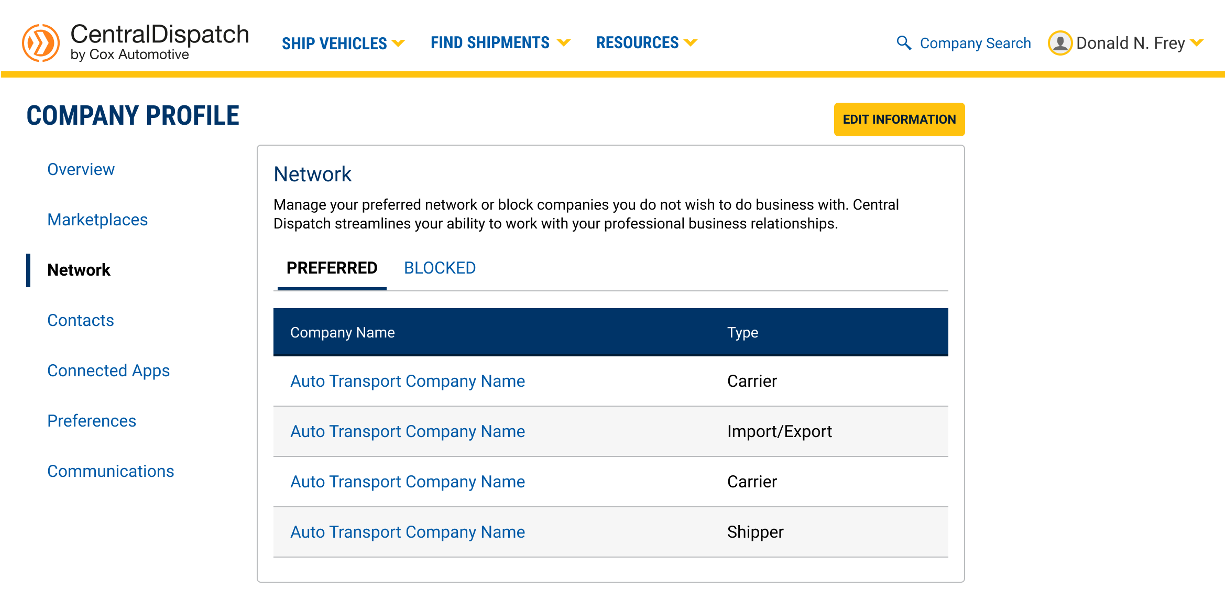
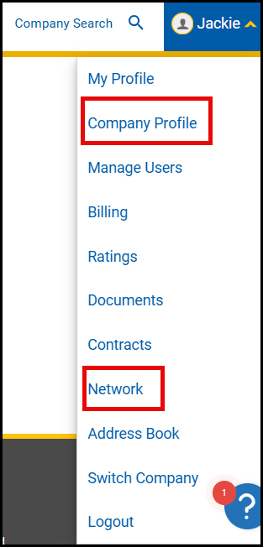
Access your Network by clicking on your account name and clicking the Company Profile link or the Network link
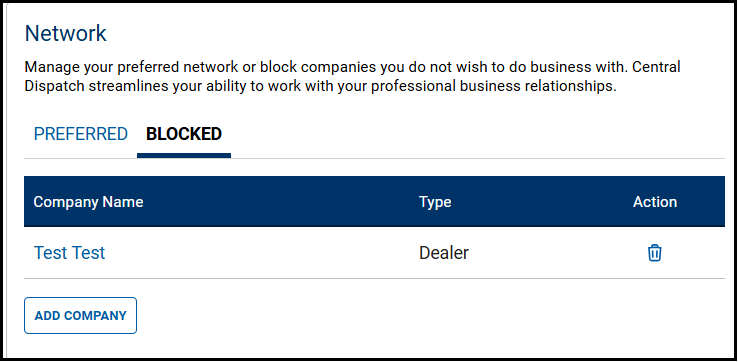
1. To Add Company to your Preferred or Blocked list, click on the appropriate tab and click Add Company
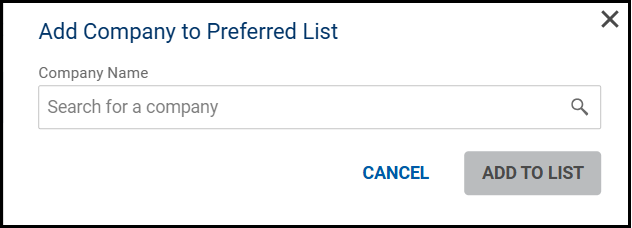
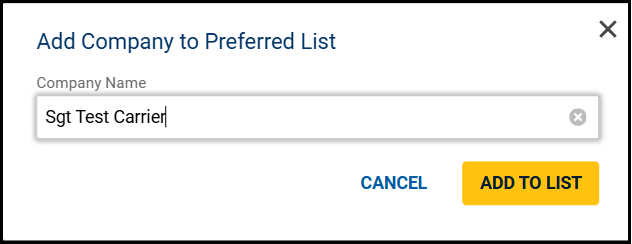
2. Search for the Company and click Add to List
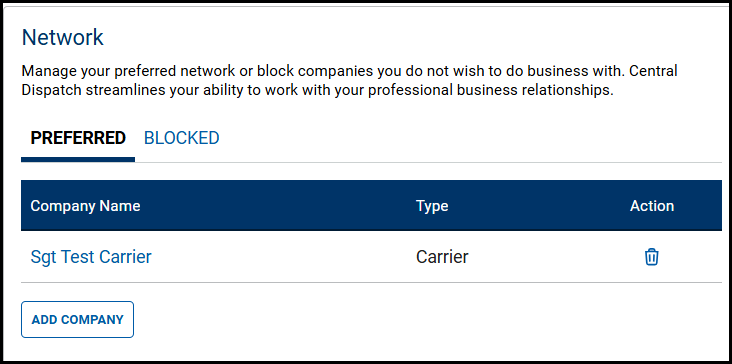
- Click the Trash Can icon under the Action column to remove the company from the Preferred or Blocked list
3. A company can also be added to the Preferred or Blocked list from the Company Overview page by clicking Prefer or Block button
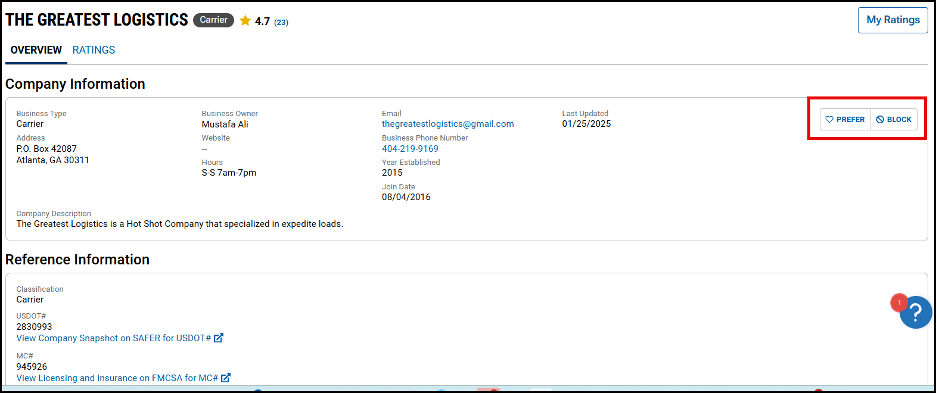
- You are also able to view if the company is on your preferred or blocked list from the Company Overview page
- Click on the Prefer or Block button to remove them from the list
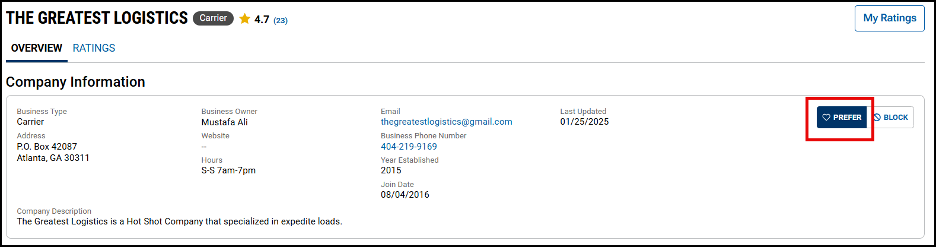
Result: The company will appear on the list for their Network
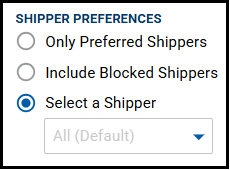
Search Vehicles
- When searching for vehicles, listings from Blocked shippers will not appear in the results
- Use the Shipper Preferences filter to include listings for Only Preferred Shippers or Include Blocked Shippers in your results
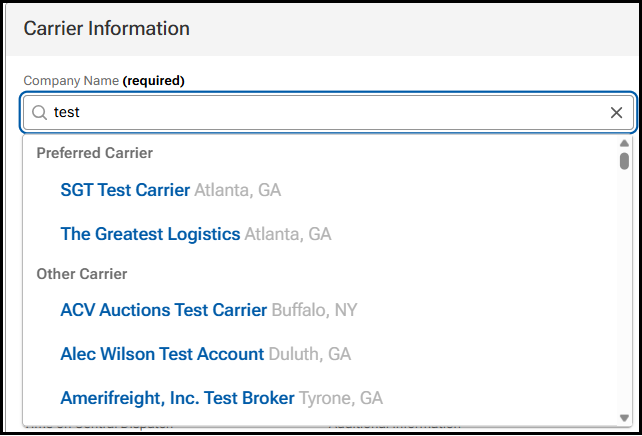
Create Dispatch or Assign Load
- When creating a dispatch or assigning a load, Preferred Carriers will display at the top of the carrier list
- Carriers that are on the Blocked list will not display when searching for carriers
Like most dealers, Adam Richmond priced his shipments with profitability in mind. But trying to find that perfect price on his own was a slow, tedious process that led to delays and frustration. It was time for a change.
“We were spending days slowly, incrementally increasing what we were going to pay for a load. We needed a new process and Price Check Plus gave us that.”
Now with Price Check Plus, Richmond and his team instantly see what each load is going to cost. It not only helps them dial in that ideal price, but gets loads picked-up faster.
“Price Check Plus basically allows us to become better stewards of time. You post your shipment, you understand what you should pay, you get contacted by the shippers — it’s changed the way we think about shipping.”
But the upgrade won’t just help him price better. Adam is preparing to take advantage of Premium’s seamless API integrations, which will allow his team to work more efficiently, and cut down the amount of time they spend entering and updating load information.
“Before, we had to make manual updates every time a vehicle’s status changed. Now with the API integration, we’ll actually be able to put the load in one time. It will automatically pull over to our data service and will greatly increase our ability to be efficient.”
Plus, the Central Dispatch staff has provided expert support at every step of the process, ensuring a seamless experience, and even helping Adam expand into new geographic markets.
“Central Dispatch has helped us think differently about what freight means to our business. They’ve helped us expand our reach, and given us opportunities to look at areas of the country we might not have before.”
Get Adam’s full story in the video interview.
Digital logistics has brought many benefits to both shippers and carriers, but it’s also increased the risk of phishing scams. Make sure you know how to identify and avoid them with these tips and best practices from our Marketplace Integrity Team.
How To Spot Phishing
- Most phishing scams start when a bad actor contacts you via text or email, asking you to click a link. That link often looks like the Central Dispatch login page, but is in fact a phishing site designed to capture your username and password.
- Other times they’ll direct you to a fake FMCSA website where you’ll be prompted to enter your FMCSA details.
Best Practices To Keep Your Business Safe
- Pay attention to notifications from Central Dispatch alerting you to changes in your user or company profile. Take action by calling Central Dispatch immediately if this looks suspicious to you. Never click on any links received via email and/or text from third parties directing you to Central Dispatch.
- Always type the URL in your browser before entering login or account information.
- Take precautions if anyone is offering you money to re-route a delivery. Request that all changes and communications be made within the Central Dispatch platform.
- Take extra care to double-check details, like confirming the identity of the shipper or carrier. This can prevent costly mistakes and keep your business safe.
Visit our Safer Shipping Hub to learn more about other ways you can keep your business safe.
Questions about security or fraud? Contact our Marketplace Integrity team at CentralDispatchFraudClaims@coxautoinc.com
